
This guide will walk you through how to start an OnlyFans account from scratch, even without followers.
You’ll learn how to create your profile, set pricing, and attract paying subscribers.
We’ll also explain how beginners can earn money with tips, pay-per-view, and custom content.
How to Start an OnlyFans and Make Money in 2025 – A Complete Career Guide for Beginners
When I first heard about OnlyFans, I thought it was just another platform for adult creators. But after doing deep research, I found out that this platform has become one of the most diverse, profitable, and flexible income sources for creators of all types — from fitness coaches to musicians, artists, educators, and, yes, adult entertainers too.
You’ll learn how to start an OnlyFans without followers, develop your brand, create content (adult or non-adult), set pricing, and promote your page effectively. We’ll also look at real success stories (including the top 3–5 highest earners on OnlyFans) and discuss legal, tax, and privacy matters. By the end, how to get started on OnlyFans will feel much less intimidating – even if you’re a total beginner. Let’s dive in!
What Is OnlyFans & It Works?
OnlyFans is a subscription-based content platform launched in 2016. As of late 2024, the platform boasts:
- Over 320 million registered users
- More than 5 million creators
- $8 billion+ paid out to creators till date
OnlyFans is a social subscription platform that allows creators to monetize content by offering it to fans for a fee. Fans subscribe on a monthly basis (or pay per post) to access a creator’s exclusive content. While OnlyFans is best known for adult content (NSFW photos and videos), it’s not just for adult content – creators in fitness, cooking, music, art, education, and lifestyle niches also use it to share premium content with their audience (Source: linktr.ee) The platform gained massive traction during the pandemic, and by 2023 it had over 305 million registered users and 4.1 million creators sourced by ladbible.com.
As a creator, you can post content (photos, videos, articles, audio, etc.) to your feed for subscribers. You set a monthly subscription price (anywhere from $5 to $50). Fans who pay can see all your posts. You can also send paid private messages or PPV (pay-per-view) content for additional fees, and fans can tip you on posts or in messages. OnlyFans pays creators 80% of all earnings and keeps a 20% cut as the platform fee. This means if you charge $10/month, you receive $8 per subscriber (before taxes).
From what I’ve seen, the earning potential on OnlyFans ranges widely. The platform has paid out over $6.6 billion to creators in 2023 alone.
As per social-rise.com, Top celebrities and influencers have made eye-popping sums (we’ll see examples soon). However, keep in mind the average OnlyFans creator makes a modest amount – roughly $150–$180 per month on average.
Since earnings are very top-heavy. In fact, the top 1% of creators earn about one-third of all the money on the platform, and the top 10% take home around 75%
Don’t let that discourage you, but it’s good to set realistic expectations. With consistency and smart strategy, many creators use OnlyFans as a nice side hustle, and some even turn it into a full-time career.
Now, let’s get into how to start an OnlyFans for beginners – from creating your account to growing your earnings.
Step-by-Step: How to Start an OnlyFans Account
If you’re brand new, here’s how to sign up for OnlyFans and get your account ready:
- Visit OnlyFans and Sign Up: Go to the OnlyFans website and click Sign Up. You can sign up with an email and password, or use a Twitter/Google account for quick login. Using an email is straightforward – just be sure to use an email you’re comfortable linking to this endeavor (some creators prefer a new, anonymous email for privacy).
- Verify Your Email: OnlyFans will send a verification link to your email. Click it to confirm your account. As I found during my research, verification is important to ensure you’re a real person and of legal age.
- Complete Your Profile Info: After logging in, you’ll be prompted to set up your profile. This includes choosing a display name, a username (your OnlyFans handle), and adding a profile picture and header image. Take time here – use a clear, eye-catching profile photo (some use a professional-looking headshot or logo).
- Write a bio that tells potential subscribers what you offer. For example, “Fitness coach sharing weekly workout videos and meal plans” or “Spicy cosplay content – new sets every week ”. This is essentially how to make an OnlyFans page appealing: clarity and personality.
- Verify Your Identity: OnlyFans requires all creators to be 18+ and to verify identity for legal and safety reasons. You’ll need to provide a government-issued ID (like a passport or driver’s license) and likely a selfie for verification.
- This process can take a day or two for OnlyFans to approve. It’s a one-time process. From what I’ve seen, every legitimate platform does this to prevent underage or fraudulent accounts.
- Set Up Banking (Payout): Next, you’ll connect a payout method so you can get paid. Depending on your country, you may add a bank account (ACH transfer), a credit card for payout, or a third-party payment service. OnlyFans will ask for tax information too (like a W-9 form for U.S. creators) because this is income.
- Make sure the name on your bank or payout method matches your ID.
- How to set up an OnlyFans account for payment is pretty straightforward on the site – follow the “Add Bank” prompts under your account Earnings/Payout settings. This step is required before you can start earning.
- Set Your Subscription Price: You can now choose what monthly price to charge subscribers (or set it free). OnlyFans lets you charge between $4.99 and $49.99 per month.
- Many beginners start around $9.99 or $10 a month, which tends to attract more subscribers. You can change this price later, but existing subscribers stay at the old rate unless they re-subscribe. Consider starting a bit lower to build an audience, unless you already have a following willing to pay a premium.
- Add Your First Posts: Before you announce your OnlyFans, populate it with a few pieces of content. This way, anyone who subscribes on day one has something to see (and feels they got value immediately). For example, you might upload an introduction post (text or video greeting new fans), and a couple of photos or videos that represent the kind of content you’ll be offering. From what I’ve seen, having 5-10 posts ready is a good start so your page doesn’t look empty.
That’s it – you’ve essentially started your OnlyFans page! Your account should now be live (if verification is approved). Now let’s talk about making your OnlyFans page enticing and building your brand.
How to Make an OnlyFans Page That Stands Out
Setting up your account is only half the battle. The next step is building and branding your OnlyFans page so that it attracts subscribers. Think of this like setting up a mini-business:
- Choose a Niche or Theme: Successful OnlyFans creators usually have a clear niche or theme. Ask yourself what content you’ll create consistently. It could be adult content (e.g. tasteful nudes, erotic cosplay, etc.), or non-adult content (fitness coaching, cooking tutorials, music lessons, art demos, daily lifestyle vlogs, you name it). Choosing a focus helps you target a specific audience.
- For example, if your niche is fitness, your page might feature workout videos, diet tips, and transformation photos. If it’s cosplay, maybe you offer sexy costume shoots and behind-the-scenes of making outfits. Don’t try to be everything for everyone; as I found during my research, having a specific niche helps you stand out. (Source Link)
- Create a Memorable Persona: You don’t have to use your real name on OnlyFans. In fact, many creators use a stage name or alias. Pick a name that fits your brand and is easy to remember (and search). For instance, one successful creator chose a playful teacher persona “Hot4Teacher” and even built a whole brand around a hot teacher character, staying anonymous but engaging reported by businessinsider.com.
- Whether you’re “FitGoddessJane” or “RockinChefMike,” find something unique. Keep your tone and style consistent – this becomes your personal brand.
- Profile Visuals and Bio: Use high-quality visuals on your page. Your profile picture should represent your content – if you’re in fitness, maybe a fit, smiling photo in workout gear; if you’re doing boudoir, maybe a sultry portrait (within OnlyFans guidelines). The cover banner can further set the mood (some creators use a collage of their photos, or a stylish graphic with their name).
- Write a friendly bio that welcomes people and highlights what you offer. For example: “Hey, I’m Jane! Certified trainer sharing my exclusive workouts, nutrition tips, and daily motivation. New videos every week. Join my fit fam!” Keep it short, fun, and clear about your content schedule or perks (like “Monthly live Q&A” or “Custom diet plans for top tippers!”).
- Plan Your Content Strategy: Decide how often you’ll post and what types of posts. A consistent schedule helps retain subscribers. You might promise “daily posts” or “3 full photo sets per week + 1 video” or whatever fits your workflow. Newcomers often underestimate the importance of consistency – in my experience advising creators, reliability builds trust. It’s better to start with a manageable schedule (say, 2 quality posts a week) than to promise daily and burn out.
- We’ll discuss content tips shortly, but start brainstorming content ideas that fit your theme. If you have multiple interests, you can incorporate them (e.g. a lifestyle creator might post cooking one day, gym selfies the next, etc.), just make sure it aligns with what your fans signed up for.
- Set Boundaries (Especially for Adult Content): If you are doing NSFW/adult content, decide early on what you are comfortable doing or not doing. Will you show your face? (Some do face-less content successfully). Are full nudes okay or just implied nudity? Video or just photos? Setting clear boundaries will help you communicate with fans and avoid discomfort. There are niches for virtually every comfort level – for example, one couple on OnlyFans kept the wife’s face hidden and built a successful “hot teacher” persona with mostly faceless content.
- Know your limits and stick to them. You can absolutely start an OnlyFans without showing your face if you prefer, but you’ll need to get creative in other ways to engage fans (personality, themes, etc.).
By crafting a strong profile and brand, you make a solid first impression on anyone who finds your OnlyFans page. Next, let’s delve into picking the right content and some creation tips.
How to Start an OnlyFans Without Followers
One of the most common questions I get is: “Can I start an OnlyFans without followers?” The answer is: YES — but you’ll need to be proactive.
Here’s what I recommend:
- Use Reddit, Twitter, and TikTok to promote
- Reddit is HUGE for adult creators. Look for subreddits like r/OnlyFansPromotions or niche communities like r/FeetPics or r/FitnessGirls.
- Twitter (X) allows NSFW content. Post teasers daily and pin your OnlyFans link.
- TikTok is great for lifestyle creators — just stay within their guidelines.
- Join creator shoutout groups
- You can do S4S (Shoutout for Shoutout) with similar creators to cross-promote.
- Use Linktree or Beacons
- Post one link across platforms that includes your OnlyFans, socials, and email.
- Engage, engage, engage
- Reply to DMs, comments, and tweets. Be a real human — it builds connection.
Remember, many top earners started from zero. It’s about consistency, not luck.
Choosing a Profitable Niche (Adult and Non-Adult Ideas)
As per my experience, picking a niche can make or break your success. Here are a few that work extremely well:
Adult Content Ideas:
- Glamour modeling
- Cosplay fantasies
- Feet pics, lingerie, roleplay
- Couples content
- ASMR with moans/whispers
Non-Adult Content Ideas:
- Fitness workouts
- Meal prep and cooking videos
- Meditation & wellness routines
- Behind-the-scenes of music creation
- Art process + digital downloads
- Tutorials: makeup, photography, guitar
Pro tip: You can also combine categories. For example, many fitness creators post semi-spicy workout sets that blend both fitness and adult appeal.
Content Creation Tips: Lighting, Camera, and Style
You don’t need a DSLR. Most creators use iPhones or Androids. But presentation matters. Here’s how to make an OnlyFans content setup work:
- Use a ring light for clear lighting (around $30 on Amazon)
- Keep the background clean or use a curtain backdrop
- Use a tripod — no shaky hands
- Shoot in natural daylight if possible
- Use apps like InShot, CapCut, or Lightroom to enhance videos/photos
- Film in vertical format (for mobile viewers)
And always batch your content — shoot multiple posts at once and use the OnlyFans scheduler to post throughout the week.
Monetization: How to Start an OnlyFans and Make Money
There are 7 main ways to make money: What’s great about OnlyFans is that it’s versatile – you’re not limited to just posting videos or pics. Once you have a loyal following, you can diversify your income on and off the platform. Here are additional ways to monetize your OnlyFans presence:
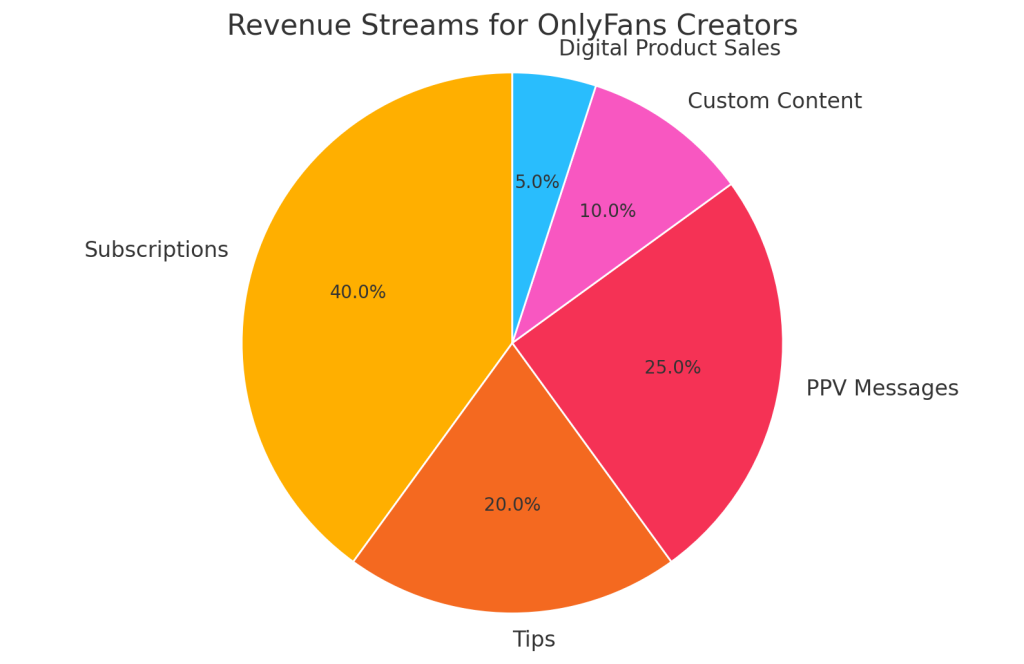
- Monthly Subscriptions
- Recurring income from fans
- Pay-Per-View (PPV) Messages: As per data, many creators make 60% of their income from PPVs and tips — not just subscriptions. Success on OnlyFans can open other doors. Some creators branch out to platforms like Patreon, Fansly, or even start a YouTube channel to widen their audience (and funnel more people to OF). Others might get modeling gigs or sponsorships due to their popularity. Basically, as you build your personal brand on OnlyFans, keep an eye on opportunities off-platform too. This guide is about OnlyFans, but your brand can exist beyond it – ultimately diversifying ensures you’re not reliant on one platform.
- Custom Content : Fans love personalized experiences. You can charge for custom requests – for example, a fan might pay you $50 to create a specific photo set or video just for them (within your comfort limits). Many adult creators do this for specific fetishes or personal messages (like a custom birthday shoutout in a sexy outfit).
- Live Streaming : OnlyFans has a built-in live streaming feature. Going live lets fans interact in real time via chat and they can tip during the stream. This can feel like a personal hangout. Some creators schedule a weekly live stream (like a live workout class, live cooking, or just a Q&A hangout). Lives can drive lots of tips if you have dedicated fans present. Also, you could offer one-on-one live sessions at a premium price.
- Selling Digital Products: In addition to the content on OnlyFans, you can create digital goods to sell. This could be an eBook, a PDF guide, a paid podcast, etc. For instance, a financial advisor on OnlyFans might compile an eBook of investing tips and sell it as a one-time purchase to subscribers. A yoga instructor could sell a 30-day yoga challenge PDF.
- Affiliate Marketing and Shoutouts: If you have a sizable audience, brands might pay you to promote their product (though this is more common on Instagram/YouTube, it can happen on OnlyFans for relevant stuff). Additionally, creators often do shoutout for shoutout (S4S) or paid shoutouts. For example, you could charge another creator a fee to promote their OnlyFans to your fans (this happens a lot within the adult creator community as cross-promotion). Ensure any promotion aligns with your brand (don’t spam your fans with too many paid shoutouts or they’ll lose trust). Also, OnlyFans used to have a referral program where you earn a percentage if you refer a new creator to the platform.
Pricing Strategy: How to Set Your Rates
One of the most common questions for newcomers is how to price your OnlyFans and make money strategically. Pricing is both art and science – you want to maximize earnings but also attract subscribers. Here’s how to approach it:
Setting Your Subscription Price: As mentioned, you can charge anywhere from $4.99 to $49.99 monthly. Think about your target audience and how much exclusive content you’ll provide. Many successful creators recommend starting on the lower end (around $10-$15/month or less) especially if you’re unknown. This lowers the barrier for fans. You can always raise prices later as your content library grows. Some creators do the opposite – start high and then drop price to attract more – but that can anger initial fans, so generally starting affordable is safer. Also consider what similar creators in your niche charge (market research). If most fitness creators charge $9.99, pricing yours at $25 might price you out, unless you offer something super premium. As per my research, creators generally prefer around $10 monthly to balance volume and revenue.
| Strategy | Details | Tips & Notes |
|---|---|---|
| Subscription Pricing | Ranges from $4.99 to $49.99/month. Recommended starting price is $10–$15/month. | Start low if you’re new. Increase price as content library grows. Avoid pricing much higher than similar creators in your niche unless you’re offering premium value. |
| Free vs. Paid Page | Free page = no paywall; you earn via tips or PPV. Paid page = access only for subscribers. | Free page helps grow followers fast. Paid page ensures monthly income. Many use a free page as a teaser funnel to drive serious fans to the paid page. |
| Bundles & Discounts | Offer 3, 6, or 12-month bundles at discounted rates (e.g. $9.99/month or $25 for 3 months). | Increases upfront income and retention. Run occasional promos (e.g., Black Friday). Avoid constant discounts as fans may delay subscribing. |
| Pay-Per-View (PPV) | Extra paid content (videos, pics, PDFs, etc.). Can be sent in messages or posted on your feed. | Very effective for adult content or large non-adult products. Ensure PPV feels exclusive. Don’t lock too much content behind PPV if fans are already paying for a subscription. |
| Tipping Strategies | Fans can tip on posts or profiles. Encourage it with incentives. | Use “tip menus” or reward tippers with shoutouts or exclusive content. Identify top fans using OnlyFans analytics and treat them like VIPs. |
| Exclusive Offers & Limited Drops | Use urgency (e.g. “50% off for next 10 subs”) or time-sensitive content (e.g. “Available for 48 hours”). | Boosts impulse buying and engagement. Can also offer special bonuses when hitting subscriber milestones to encourage growth. |
| Adjusting Pricing | Reassess after 2–3 months. If you’re overwhelmed with demand, raise price. If growth is slow, consider lowering or discounting. | Use polls or ask fans directly for feedback on pricing models. Some prefer a low sub with more PPV, others prefer high sub with all content included. |
| Retention Techniques | Focus on keeping subscribers. Offer loyalty rewards for rebills (auto-renew). | Set up automatic thank-you messages with bonus content for rebillers. Manually reach out to expiring subs with offers or personal messages. Loyal fans tend to tip more and stick around longer. |
| One-Page or Multi-Page Setup | You can run one free and one paid page simultaneously. | Use free page for teasers and drive serious followers to the paid page. Some creators run everything from one well-optimized page too. Choose based on your workflow and audience. |
| Earnings Examples | Some top creators like Erica Mena earn millions monthly with a free page using PPV + tips. | Shows that a free model with strong upsell strategy can outperform paid-only models. It depends on how much effort you put into fan engagement and exclusive content. |
In summary, there’s no single way how to start an OnlyFans and make money – you can combine subscriptions, PPVs, tips, and more. Many top creators actually earn the majority of their money from upsells (PPV, custom content, etc.) rather than just the subscription fees. Find the balance that works for you and your fans. Now, beyond just content sales, let’s explore other ways to monetize on OnlyFans.
Beyond Content: Other Ways to Make Money on OnlyFans
OnlyFans isn’t just about posting pictures or videos — once you build a loyal fanbase, there are many other ways to earn.
Custom Content & Requests
Fans love personalized content. Whether it’s a custom video, a birthday shoutout, or a niche photo set, people are often willing to pay extra for something made just for them. I’ve seen creators charge $50 or more depending on the request. Just be sure to charge fairly and only accept things you’re comfortable doing.
Live Sessions
Going live is a great way to build real-time connections. You can do casual hangouts, workouts, Q&As, or private one-on-one sessions for a premium price. Fans can tip during lives, and consistent live streams can lead to steady income. Just remember to set clear boundaries and take payment upfront for private sessions.
Merch Sales
OnlyFans has partnered with Spring to make selling merch easier. If you’ve built a brand, things like T-shirts, posters, calendars, or even niche items like cookbooks or signed content can add a new income stream — and fans love owning something from you.
Digital Products
Beyond regular posts, consider selling digital content like eBooks, guides, or full-resolution photo sets. For example, a fitness coach could offer a paid workout plan, while a cosplayer might sell a premium photo pack. You can send these through PPV messages or direct fans to external platforms (though keeping it on OnlyFans is smoother).
Shoutouts & Affiliate Deals
If you’ve got a decent following, you can offer paid shoutouts to other creators — this is popular in adult niches. You can also explore affiliate marketing by promoting products or services that align with your brand. Some creators earn passive income by referring new creators to OnlyFans through the referral program (if active).
Mentoring or Coaching
Experienced creators often start mentoring others. Whether it’s paid consultations, group coaching, or an online course, your OnlyFans journey can become a lesson for others. Outside OF, you can even coach in your personal niche — fitness, mindset, music, etc.
Expand Beyond OnlyFans
Many top creators use their OnlyFans success to grow elsewhere — Patreon, YouTube, Fansly, or even personal websites. Some land modeling gigs or brand deals. The key is not to rely on one platform forever.
In short, real success comes from diversifying. You don’t need to do everything at once — start with custom content or digital offers, then grow. Keep it legal, safe, and within OF rules, and your earning potential goes way beyond subscriptions.
Marketing: How to Promote Your OnlyFans and Grow
You can’t just post and wait. Here’s how to get traction:
- Twitter/X: Post teasers, reply to viral threads, use hashtags like #OnlyFans #OFModel #FitnessOnlyFans.
- Reddit: Post daily in niche subreddits (no links in some — add it to your bio).
- TikTok (safe content): Show behind-the-scenes, body positivity, lifestyle.
- Instagram (clean version): Use it for safe previews. Add OF link via Linktree.
- Collaborations: Cross-promote with creators in your niche.
From what I’ve seen, creators who post daily on Twitter and Reddit see 2–3x faster growth than those who don’t promote consistently.
How to Start an OnlyFans for Beginners (Mindset and Schedule)
Starting from scratch? Here’s the mindset I recommend:
- Post at least 5 days a week
- Spend 30 minutes daily promoting
- Keep a content calendar (use Trello or Notion)
- Engage with your top fans (they’re your VIPs)
- Don’t compare your start to someone else’s peak
Success comes from repetition. Treat this like a small business and you’ll see the results stack up.
Success Stories and Top OnlyFans Earners
One of the best ways to stay motivated is by looking at creators who made it big on OnlyFans — both regular people and celebrities.
Bryce Adams – From $62 to $5M+
As per my research, Bryce Adams started on a whim in 2021, making $62 in her first hour. With consistency and business-minded thinking, she and her partner grew their earnings to over $5 million in just a year. This shows how a non-famous creator can succeed with strategy and effort.
Mrs. Robinson – Staying Anonymous, Earning $800K
A stay-at-home mom and her husband created a faceless persona called “Mrs. Robinson.” They started slow, posting teasing content and using Reddit for traffic. Eventually, they crossed $800K in earnings — while still not showing her face publicly. It proves that anonymity and niche marketing can still lead to major success.
Farrah – From Healthcare to Full-Time Creator
Farrah left her healthcare job and focused on OnlyFans full-time. She grew her subscriber base to 3,500 and made over $1 million in two years. Her secret? Daily Reddit promotions and consistent hustle behind the scenes.
Now let’s talk about some of the top celebrity earners:
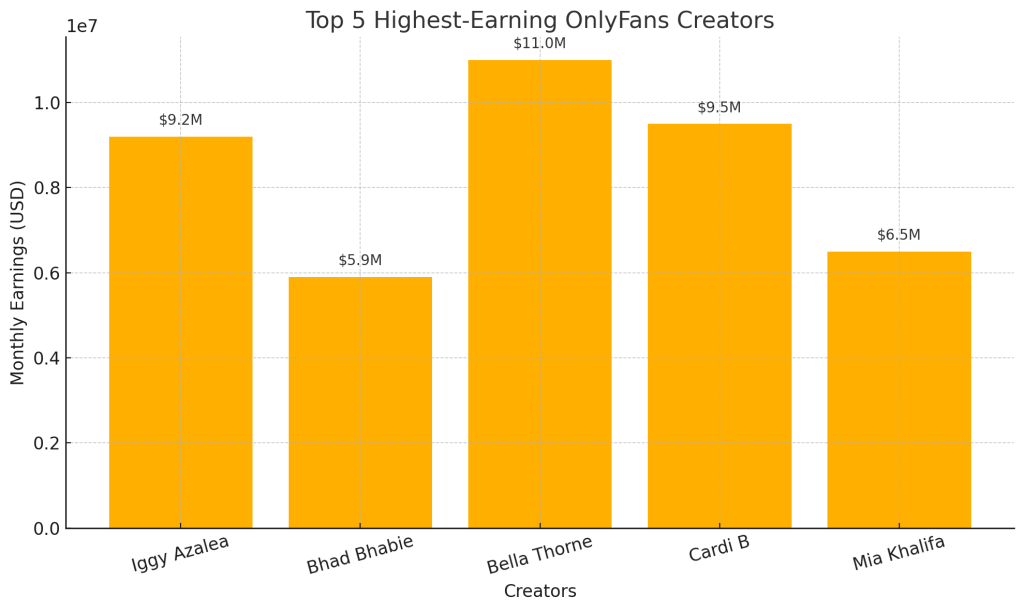
- Blac Chyna: At one point, she was reportedly making $20 million per month. Even if those numbers were exaggerated, she earned millions before quitting the platform in 2023.
- Bhad Bhabie: Known from Dr. Phil, she earned $52 million in just her first year on OnlyFans by charging $23.99/month. Fame and timing played a huge role in her success.
- Bella Thorne: She made $1 million in 24 hours and up to $11M/month at her peak. Although she caused controversy, her record-breaking debut showed the power of celebrity influence.
- Cardi B: She posted very little but still made around $47 million thanks to her massive fanbase. It shows even minimal content can work if you’re a major public figure.
- Iggy Azalea: She launched in 2023 with $25/month pricing and a mixed-media approach. Over time, she ramped up and reportedly earns over $9 million a month.
Other high earners include Mia Khalifa ($6.5M/month) and Erica Mena ($4.5M/month on a free page). Even celebs like Tyga and Amber Rose have made millions.
Now, I know these numbers are extreme. Most creators won’t make millions — but even earning a few thousand a month can change your life. Based on data, the top 10% of OnlyFans creators make over 75% of the platform’s earnings. So, aiming to be in that top tier (which might mean $1K+ per month) is realistic and rewarding if you put in the work.
Legal, Tax, and Privacy Considerations
Running an OnlyFans is like running your own business. That means you’re in charge of legal rules, taxes, and protecting your privacy.
Legal Age & Content Rules
You must be 18+ to use OnlyFans, and your content must follow strict guidelines. No illegal acts, violence, or underage appearances. If you shoot with others, they also need to be 18+ and verified on the platform. Breaking these rules can get you banned—or worse, in legal trouble.
Copyright & Ownership
You own what you post, but be careful not to use copyrighted material like music or images you don’t have rights to. Add watermarks to help protect your photos and videos from being stolen or reposted.
Leaks & Piracy
Sadly, leaks do happen. Fans may share your content illegally. Some creators use watermarking, DMCA takedowns, or legal help. It’s good to remind your fans not to leak—many will respect you if you’re upfront.
Protecting Your Privacy
If you want to stay anonymous, use a stage name and keep personal info hidden. Avoid showing anything in your content that could reveal your identity. You can block countries or states to limit who sees your profile, though VPNs can get around that.
Social Media & Security
Use separate promo accounts and new emails. Be cautious with what’s linked to your real name. Avoid using personal emails or phone numbers when signing up.
Taxes Matter
OnlyFans income is taxable. In the U.S., you’ll usually get a 1099 form if you make over $600. Set aside around 25-30% for taxes and consider paying quarterly if you’re earning consistently. You can also deduct business expenses—equipment, home office, etc. If you’re unsure, consult a tax pro.
Outside the U.S.?
Check your country’s freelance or self-employment rules. You may need to register as self-employed or pay VAT. OnlyFans adds VAT for EU subscribers, but you still need to file taxes properly.
LLC or Business Setup
Once you’re making real money, forming an LLC can help with privacy, legal protection, and possibly lower taxes. It’s not a must early on, but it’s worth considering later.
Handling Harassment
Online hate exists. If you promote on public platforms, expect occasional trolls. Block them, don’t take it personally, and remember why you started. If threats ever get serious, report them and protect yourself.
Terms Can Change
In 2021, OnlyFans almost banned adult content due to payment processors—but reversed the decision. This was a warning: don’t rely 100% on one platform. Always have a backup plan like Fansly or a personal site.
Final Note:
Treat your OnlyFans like a real business. Stay legal, pay your taxes, and protect your identity. It’s all about staying safe and making your content journey sustainable in the long run.
Top Tools & Resources for OnlyFans Creators in 2025
To run your OnlyFans smoothly and professionally, you don’t need to do everything manually. Here are some helpful tools and resources that can save time and improve quality:
Content Creation Tools: Editing apps like Lightroom, Photoshop, or Canva help you polish your photos. For videos, apps like iMovie or Premiere Rush make trimming and adding captions easy. Canva is great for creating promo banners and thumbnails too.
Essential Equipment: You don’t need fancy gear—a smartphone, ring light, and tripod work wonders. For better video/audio, consider upgrading to a DSLR and using a mic (especially for talking content or ASMR).
Scheduling & Planning : Use OnlyFans’ built-in post scheduler to queue content in advance. For social media, apps like Buffer, Later, or Hootsuite help you stay consistent. You can use Google Calendar or Trello to plan themes and track ideas.
Analytics & Insights : Check OnlyFans’ Stats page to see what’s performing best and who your top fans are. On social media, use Twitter/Instagram insights or third-party tools like Social Blade to monitor engagement and traffic drivers.
Promotion Tools : Platforms like Linktree or AllMyLinks help link all your profiles from one page. For Reddit, tools like SocialRise can schedule posts and track performance. Be cautious with bots—avoid breaking community rules.
Security & Privacy : Always turn on 2FA for your OF account and use a strong password. If anonymity matters, consider using a VPN and a separate email (like ProtonMail) to keep your identity private.
Merch & Digital Products : Use OnlyFans’ integration with Spring (Teespring) to sell merch. For digital goods like eBooks or photo sets, platforms like Gumroad or even direct PPV delivery on OF work well. Some creators also use Amazon Wishlists for fan gifts.
Time Management & Productivity : Apps like Notion or Google Sheets help track content ideas, birthdays, or fan requests. Staying organized makes scaling easier.
Optional Help : If your account grows big, you can consider a virtual assistant or explore OnlyFans agencies for help with messaging or promotion. Do your research before hiring or signing with anyone.
Frequently Asked Questions (FAQs)
Just visit the site, sign up, verify your identity, set your price, and upload your first few posts. That’s how to make an OnlyFans profile ready to earn.
Start promoting on Reddit, Twitter, and TikTok. Offer free trials or discounts to get early fans, then use their support to grow.
It’s your choice. Many top creators stay anonymous and still earn big. Always watermark your content and block specific locations for safety.
On average, new creators earn $150–$300/month in the beginning. With consistent effort and marketing, you can scale to $1,000+ per month in 3–6 months.
Absolutely. Fitness, coaching, cooking, music, art — all do well if marketed properly.
Leave a Reply